 PaidFair
Schedule it. Track it.
Split it fair.
Split the tip jar fair — to the penny, by who actually worked — then let PaidFair run the schedule, the time clock, and payroll-ready hours and tips. Plus a free cash register. Works in any browser and on every phone. No special hardware, nothing to install.
No credit card. No install. Ring your first sale in about two minutes.
Use it in any browser right now · iPhone & Android · no per-employee fees · cancel anytime · free register forever
“It replaced our tip spreadsheet completely — count the jar, everyone's paid fair, done. And the scheduling and supply list have been huge. I'm not going back.”
Run the whole business from your browser.
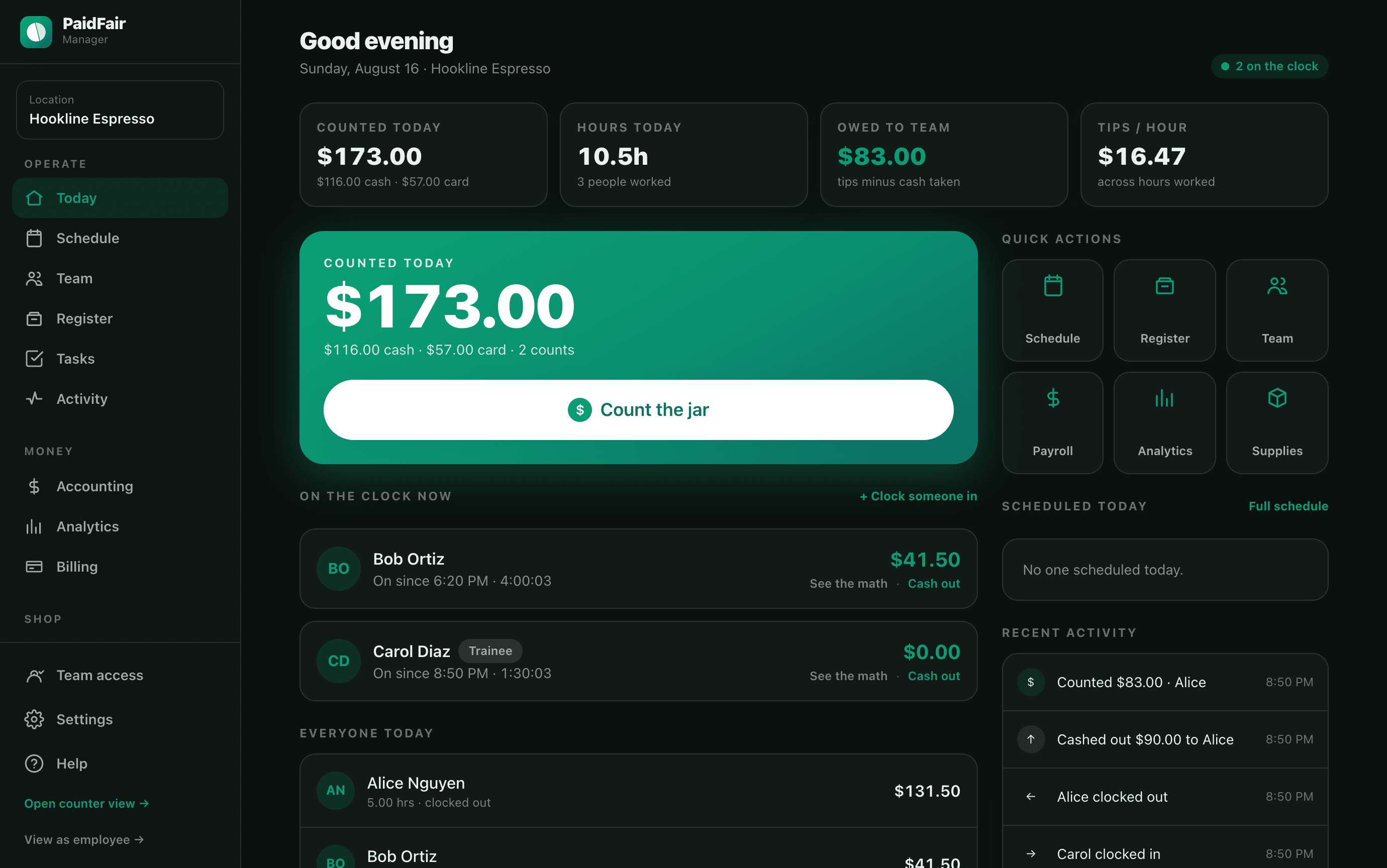
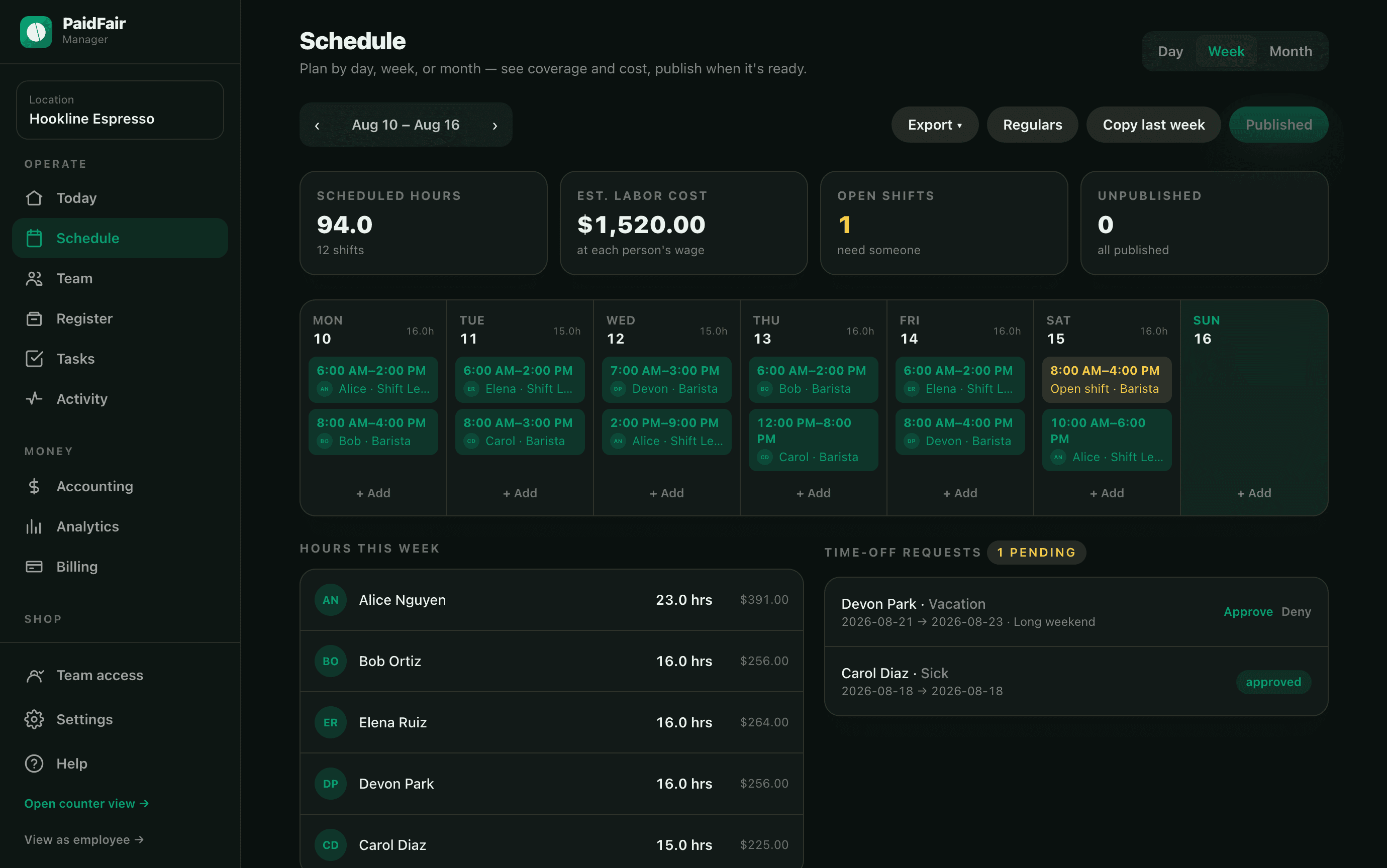
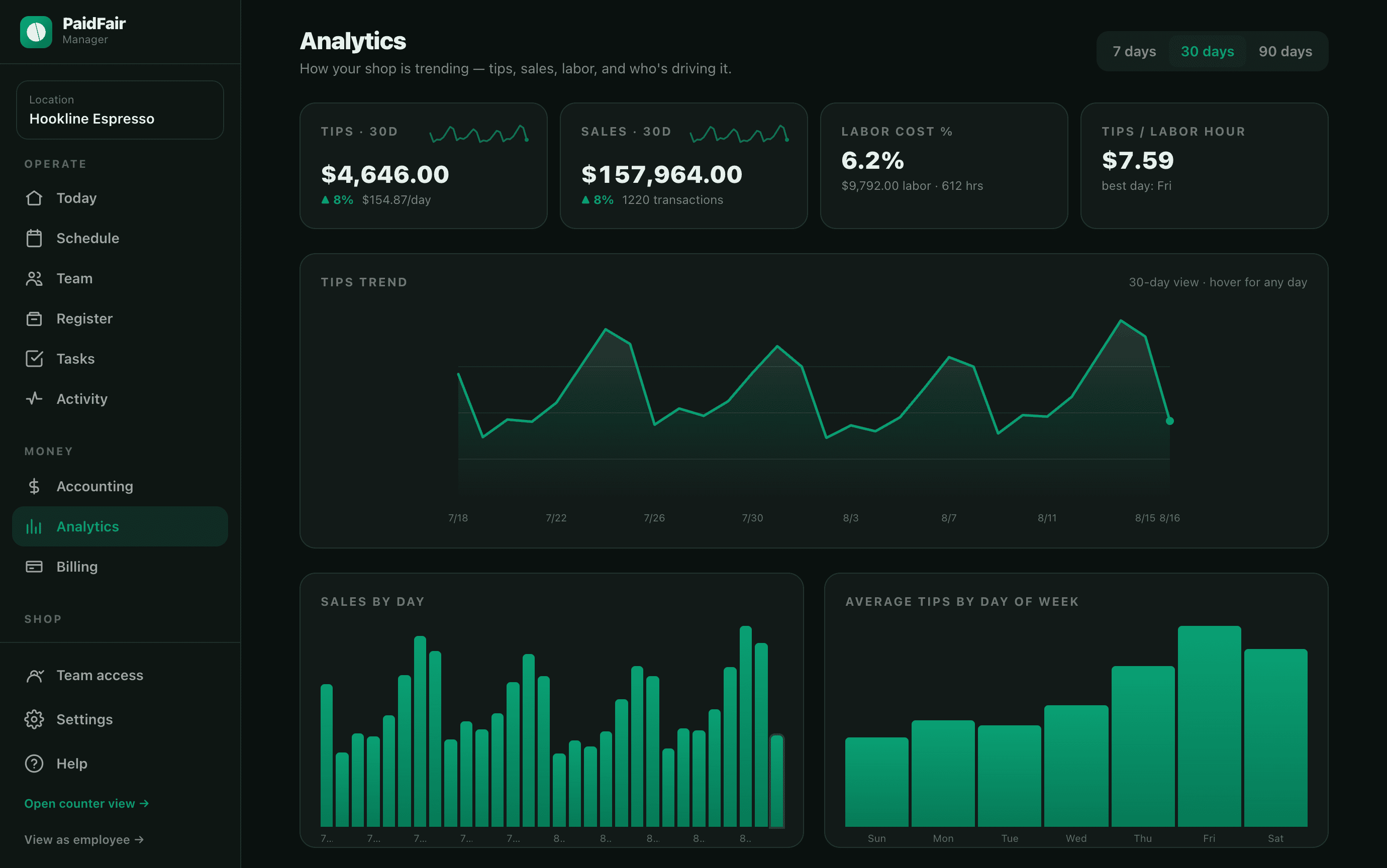
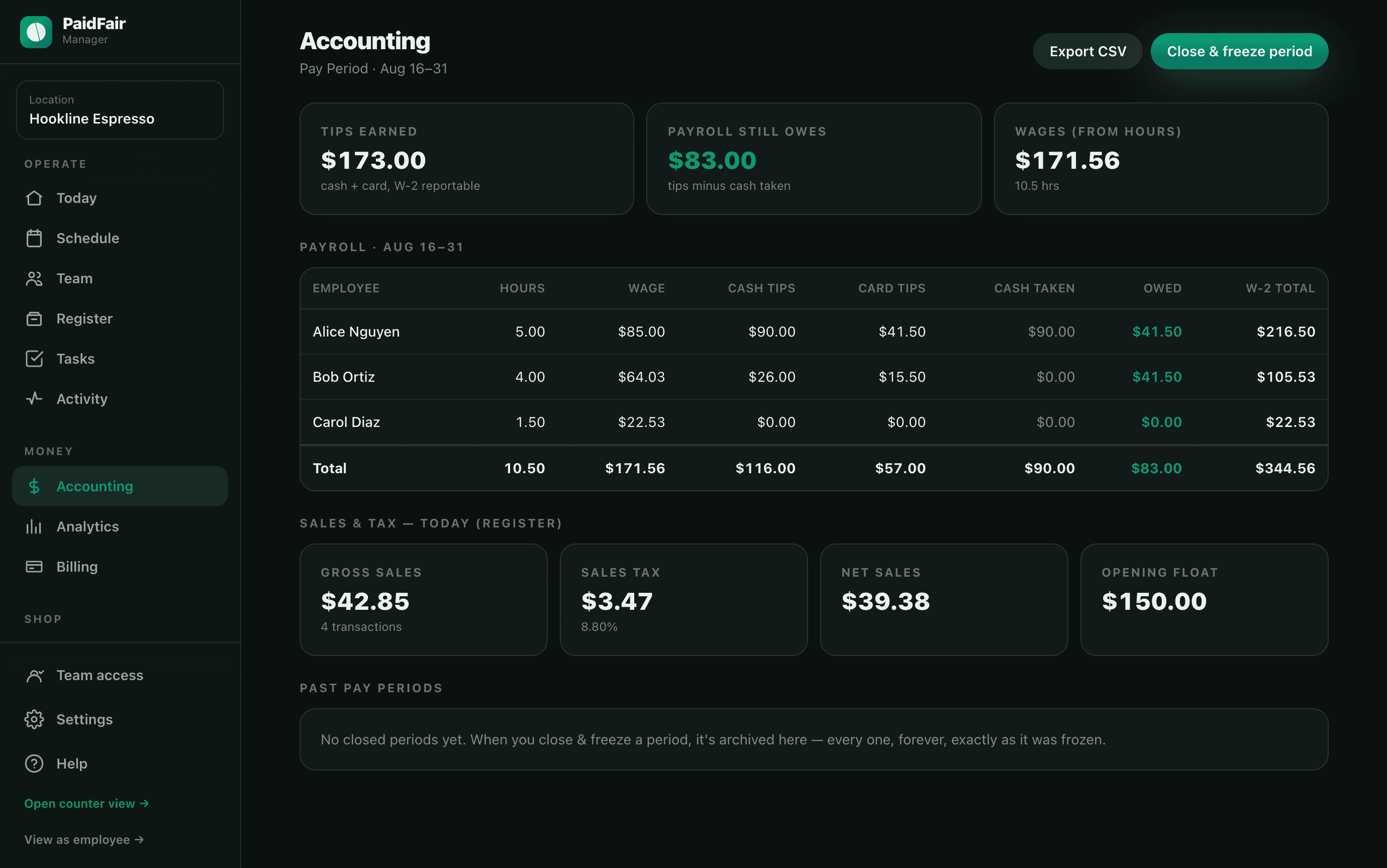
The web console is a complete product in its own right — not a companion to the app. Build the week on a clear drag-and-add schedule with live hours and labor cost, read deep analytics with interactive charts, run accounting and payroll, count the jar, and manage every location. It works on any computer, Chromebook, or tablet — Windows, Mac, or Android — with nothing to install and every figure exact to the penny.
- Nothing to install — any modern browser
- Desktop schedule, analytics & payroll
- The same cloud data as the phone apps, live
- Every figure exact to the penny
See exactly how it works.
No POS to rip out, no cards to process, no payroll to replace. Just the tools a tipped shift actually needs.
Build the schedule in minutes
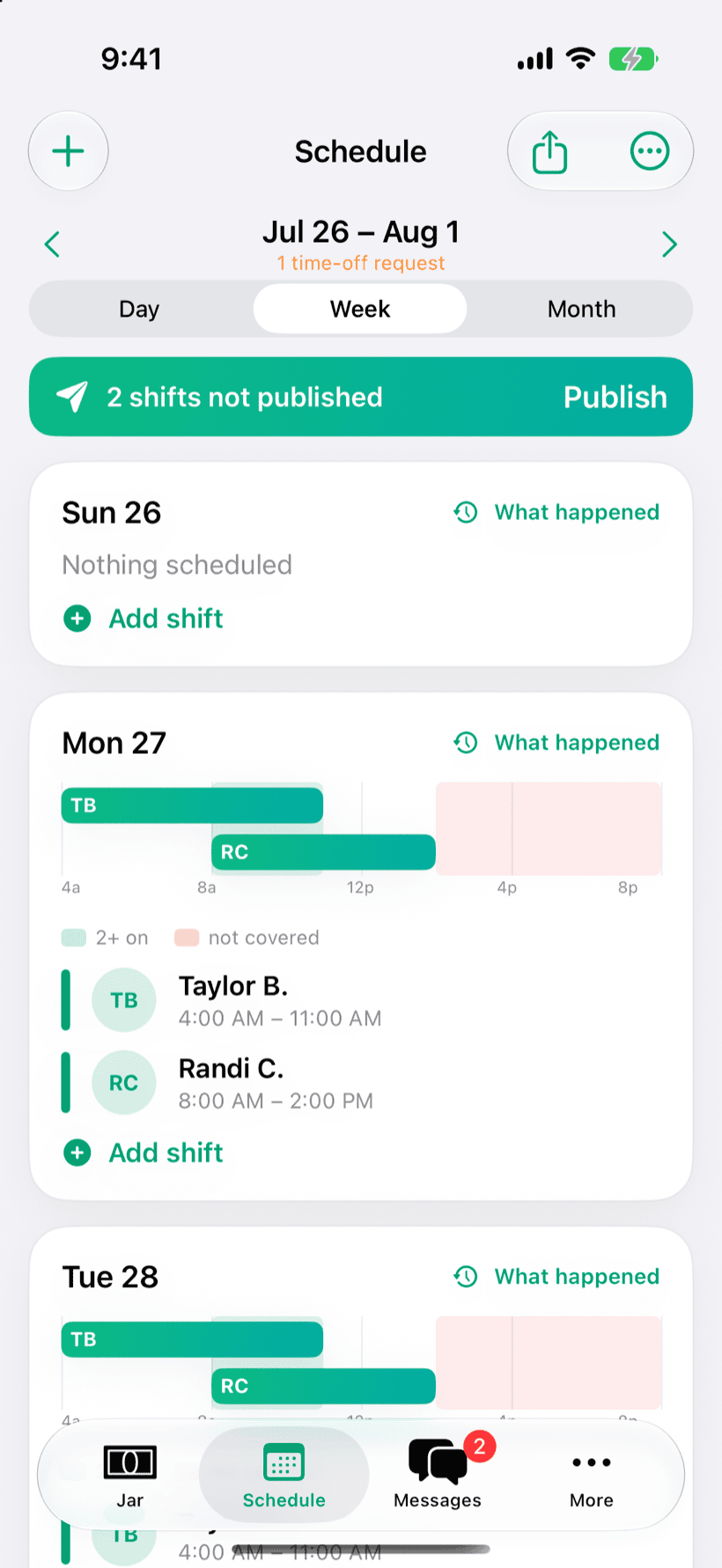
Start from your regulars or snap a photo of a written schedule, then publish the week in a tap. Staff pick up open shifts, offer a shift to a specific teammate, and request time off — you just approve.
- Shift swaps, up-for-grabs, breaks & overtime heads-ups
- Time-off approvals that block conflicting shifts
- Export any shift straight to Apple Calendar
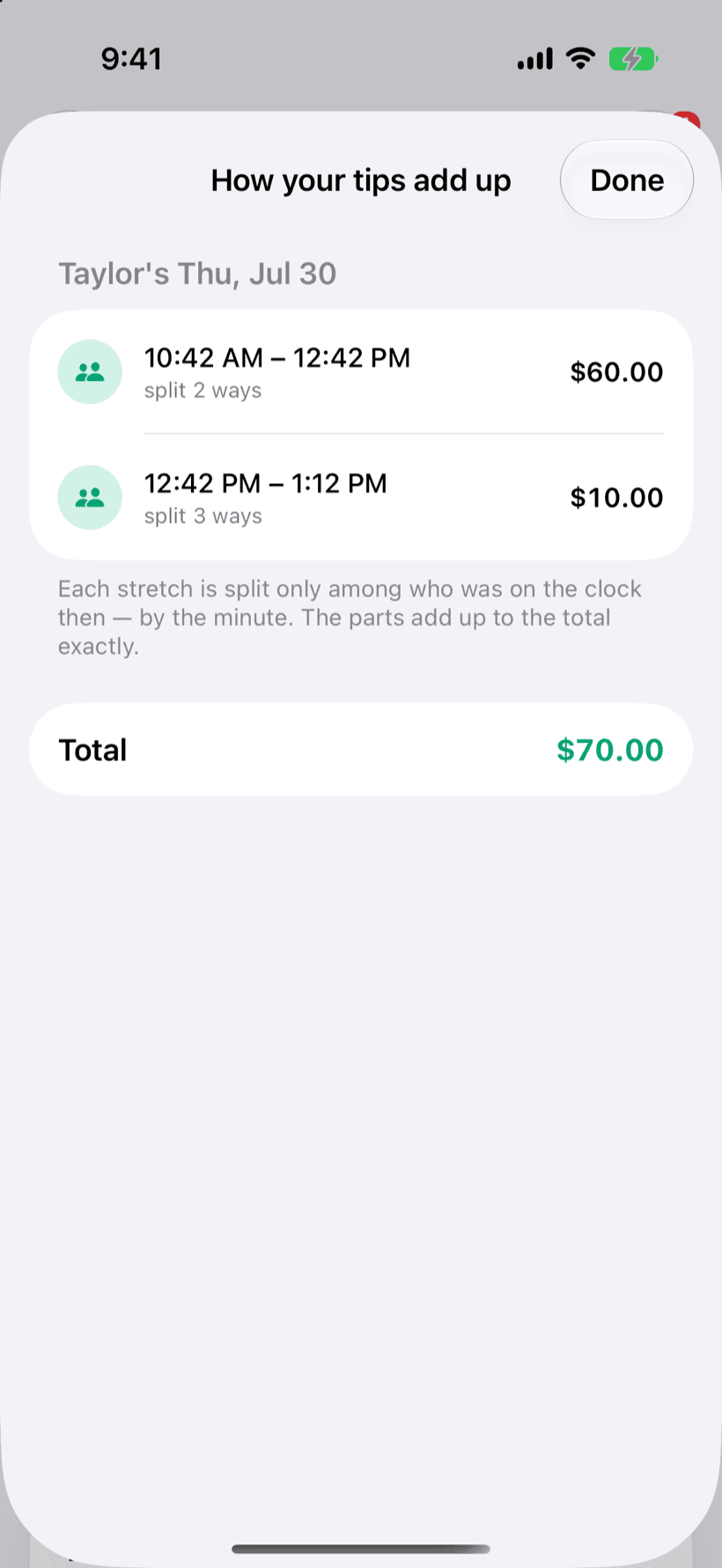
Split tips fairly, by the minute
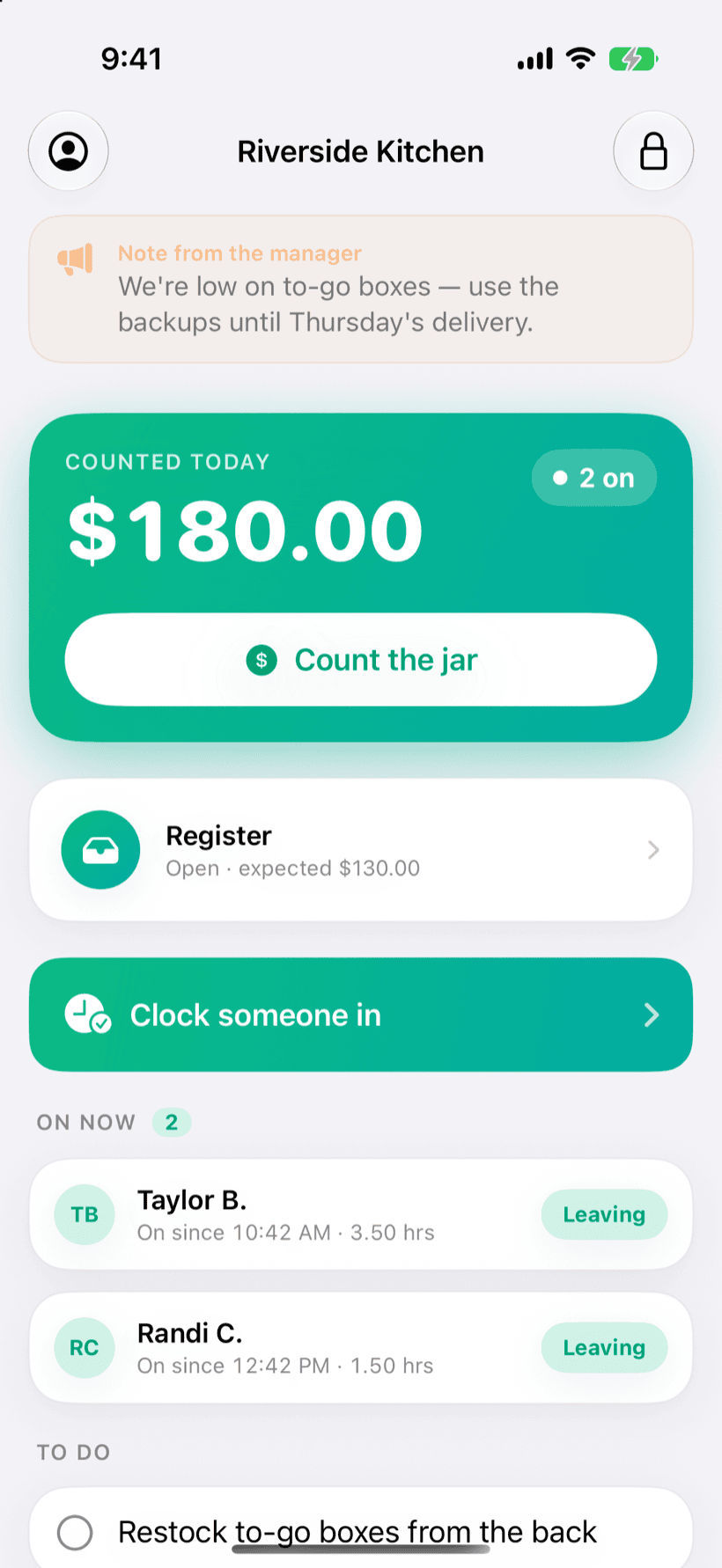
Count the jar and PaidFair divides it only across who was on — segment by segment. Someone who clocked out at 2 never touches the tips counted at 6.
- Every payout shows its own plain-language math
- Tip-outs to support & reduced trainee rates built in
- Cash & card, settled at the drawer or on payroll
- Pool the jar for a fair split — or work a solo shift and keep 100%, great for booth renters
An honest cash register — free forever
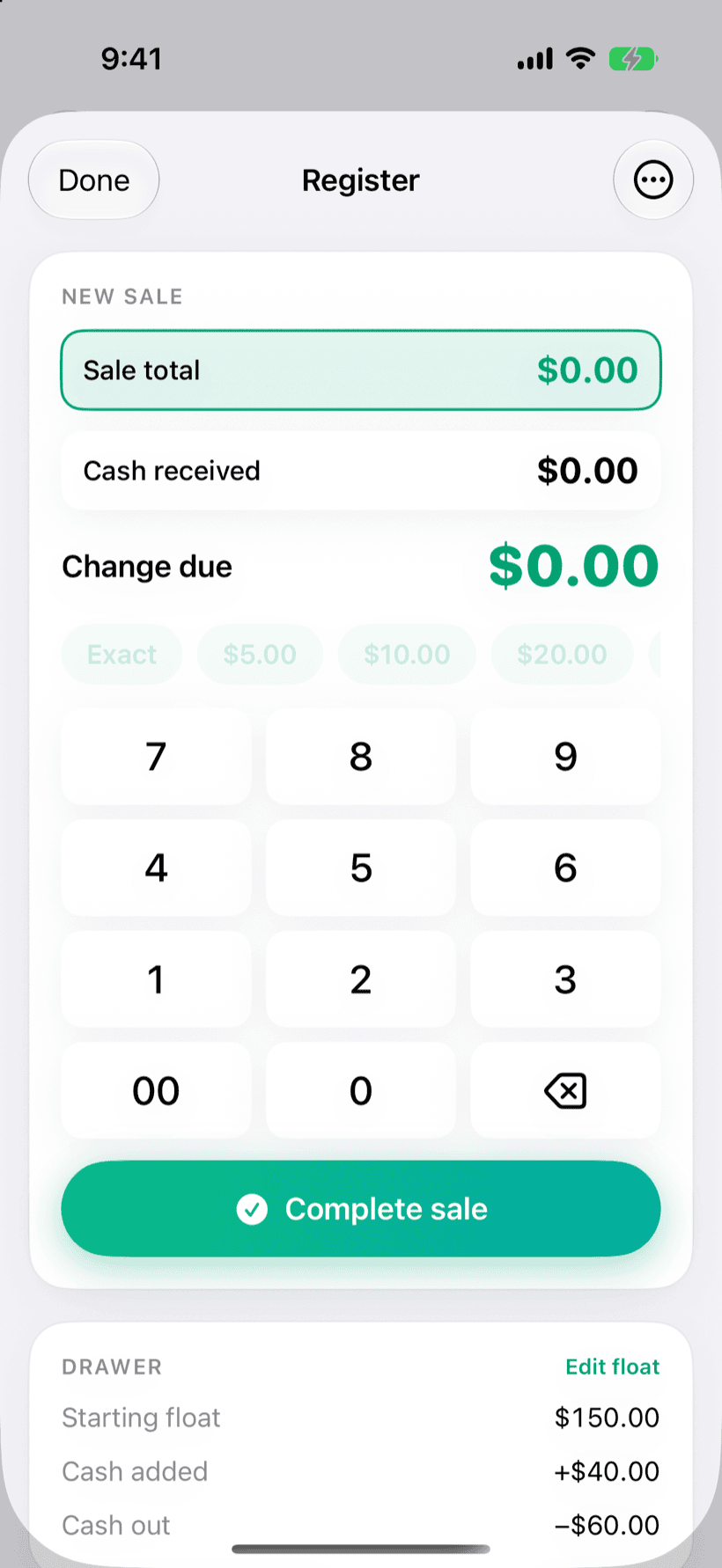
Ring a quick sale — total, cash received, change due — track cash in and out, and close with an over/short count. It's not a POS and it never touches cards. Just clean cash math.
- Free forever — no subscription, no credit card
- Enter your local sales-tax rate — it tallies tax collected for your reports
- Count by bill & coin at close, over/short in a tap
Know your numbers
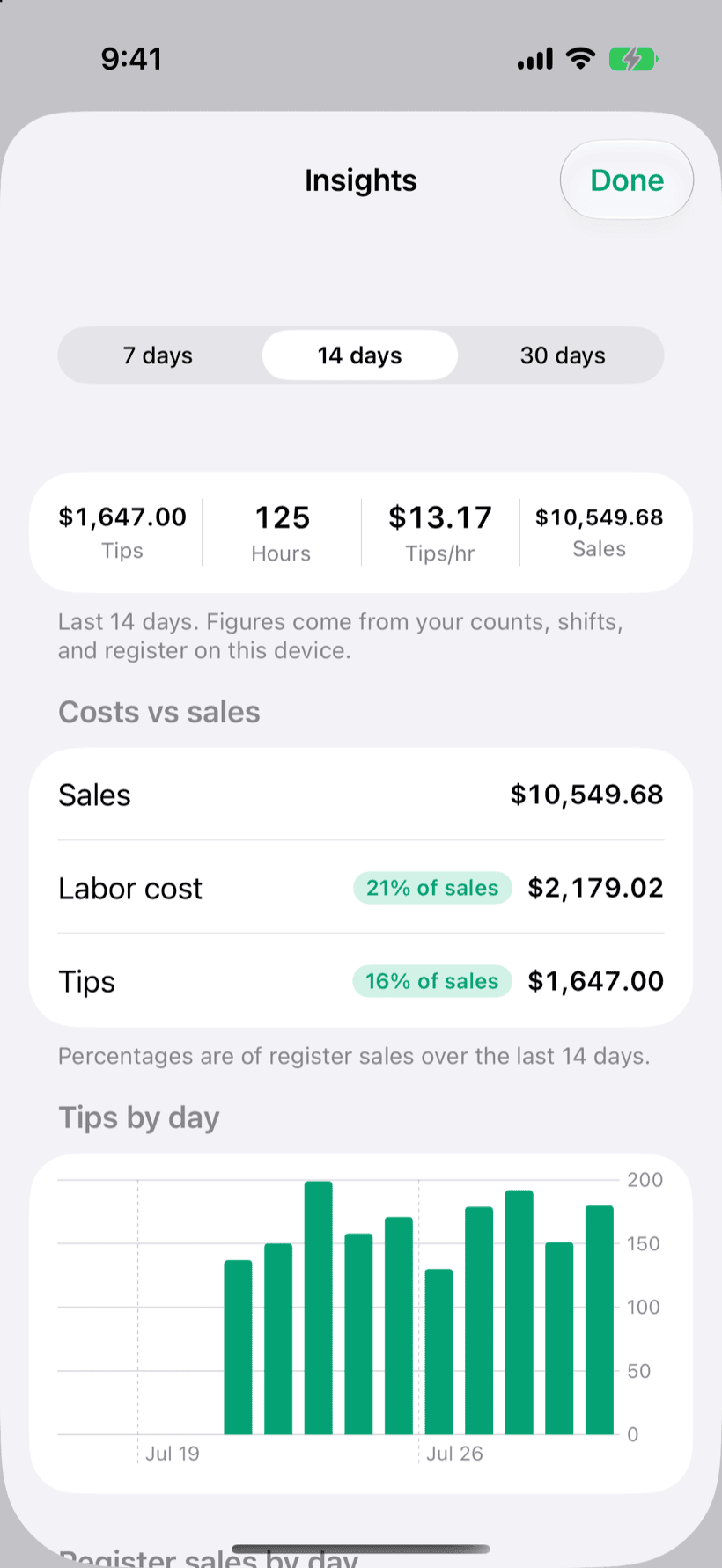
Insights on tips, sales, and hours — plus labor and tips as a share of sales, the ratios owners actually manage to. See your top earners, most hours, and who's near overtime this week.
- Tips-per-hour, labor %, and daily trends
- Payroll-ready CSV & PDF for QuickBooks, Gusto & any payroll provider
A time clock and private view for everyone
Staff clock in from their own phone — iPhone or Android — the shared counter device, or any web browser, and watch their hours tick up live. They see their own tips (and only their own), pick up open shifts, and message the team without seeing anyone else's pay.
- Works on any phone or browser — no unified device needed
- Private per-person passcodes — nobody sees another's numbers
- Or check tips with a QR code — no app, no login
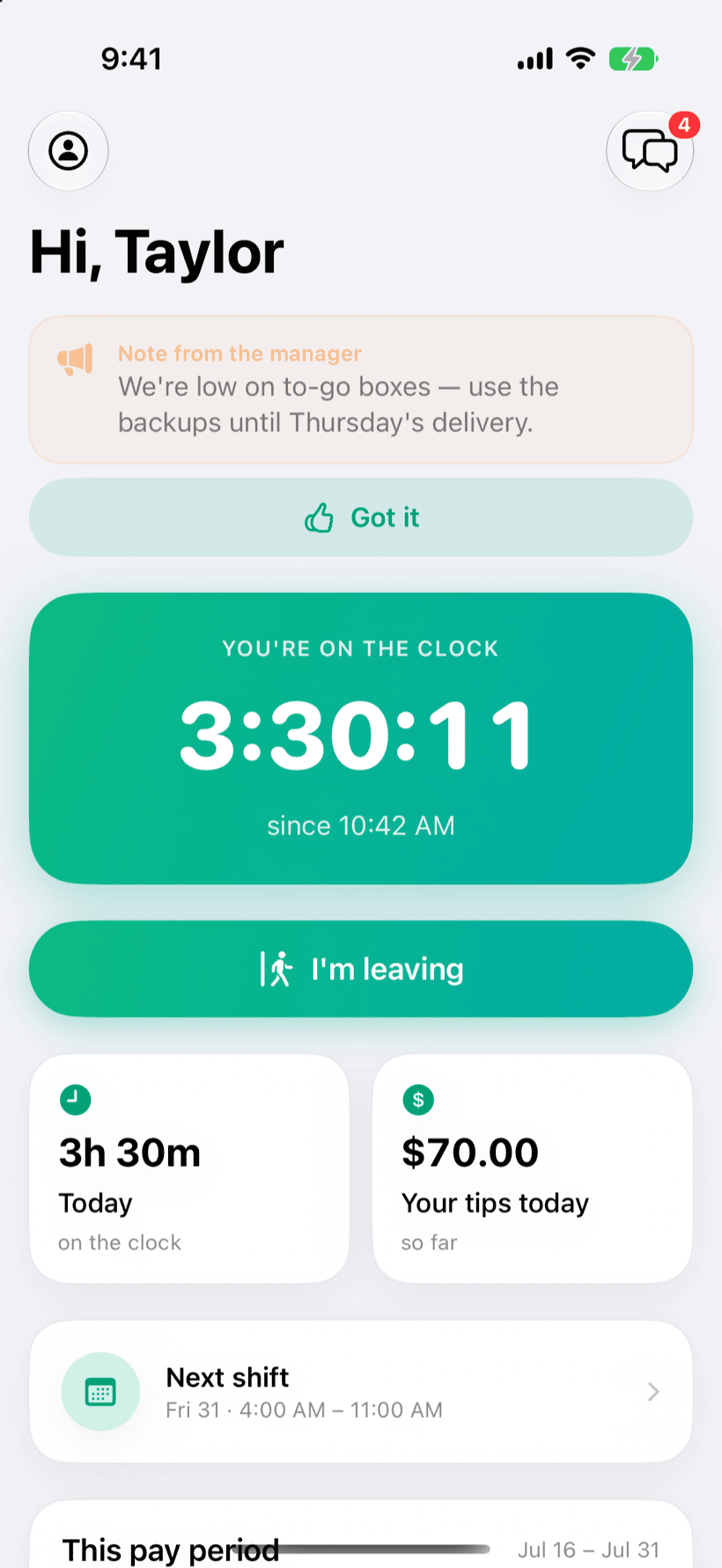
Your supply list, in one tap
Pick your kind of shop and PaidFair drops in a categorized starter list of everything you reorder — cups, lids, napkins, beans, flavors, cleaning, propane. Anyone flags what's running low and it becomes the buy list. Add the store each item comes from and the list sorts itself by supplier, so you shop and share one run at a time.
- Starter packs for coffee shops, bars, restaurants, trucks, bakeries & pizzerias
- Shop by store — share "the Costco run" in a tap
- Flag low from the floor; never run out of cups mid-rush
One app for the whole shift.
No add-ons, no per-feature upsells. Standard includes all of it.
Fair tip splitting
By the minute worked, reconciled to the exact counted total — never a penny off.
Tip-outs & trainee rates
Carve a percentage to back-of-house support and pay trainees a set share.
Scheduling
Week, day & month views. Fill from regulars or a photo of a written schedule.
Time clock & timesheets
Live clock-in on any device, running hours, and pay-period totals ready for export.
Shift swaps
Put a shift up for grabs or hand it to a specific teammate to cover.
Time off & breaks
Requests you approve, unpaid breaks that cut paid hours (never tips).
Overtime heads-up
A nudge before anyone crosses your weekly hours threshold.
Free cash register
Quick sales, drawer tracking, over/short close. Free forever, no account.
Insights
Tips, sales, hours, tips/hr, and labor as a share of sales.
Task rewards
Set a weekly prize; the team races to top the board — ranked two fair ways, confetti included.
Workplace guides
Opening, closing, lock-up & new-hire how-tos everyone can read.
Supplies & shopping list
One-tap starter packs by shop type. Flag what's low; shop by store.
Team messaging
A live team thread plus private notes — right on the dashboard.
Payroll exports
CSV & PDF, mapped for QuickBooks & Gusto — and generic exports for ADP or any provider.
Home-screen widget
Today's tips and who's on, without opening the app.
Private to your shop
Your data is isolated to your shop, encrypted in transit, never sold, and never used for ads.
Automatic cloud backup
Synced and backed up in the cloud, so a lost or dead phone is never lost data.
iPhone, Android & web
The same shop live on every teammate's phone and any browser — no special hardware to buy.
Live cloud sync
Count the jar at the counter and it updates on every phone and the web, instantly.
Multi-location & Español
Run more than one spot, switch in a tap. The whole app is in Spanish, with an in-app language toggle.
Only the tools you want. Nothing you don't.
Every part of PaidFair flips on or off in Settings. Run just the free register, or the whole suite — whatever you switch off vanishes from the screen, so the app stays clean and your team never wades through features they don't use. Go ahead, tap a few.
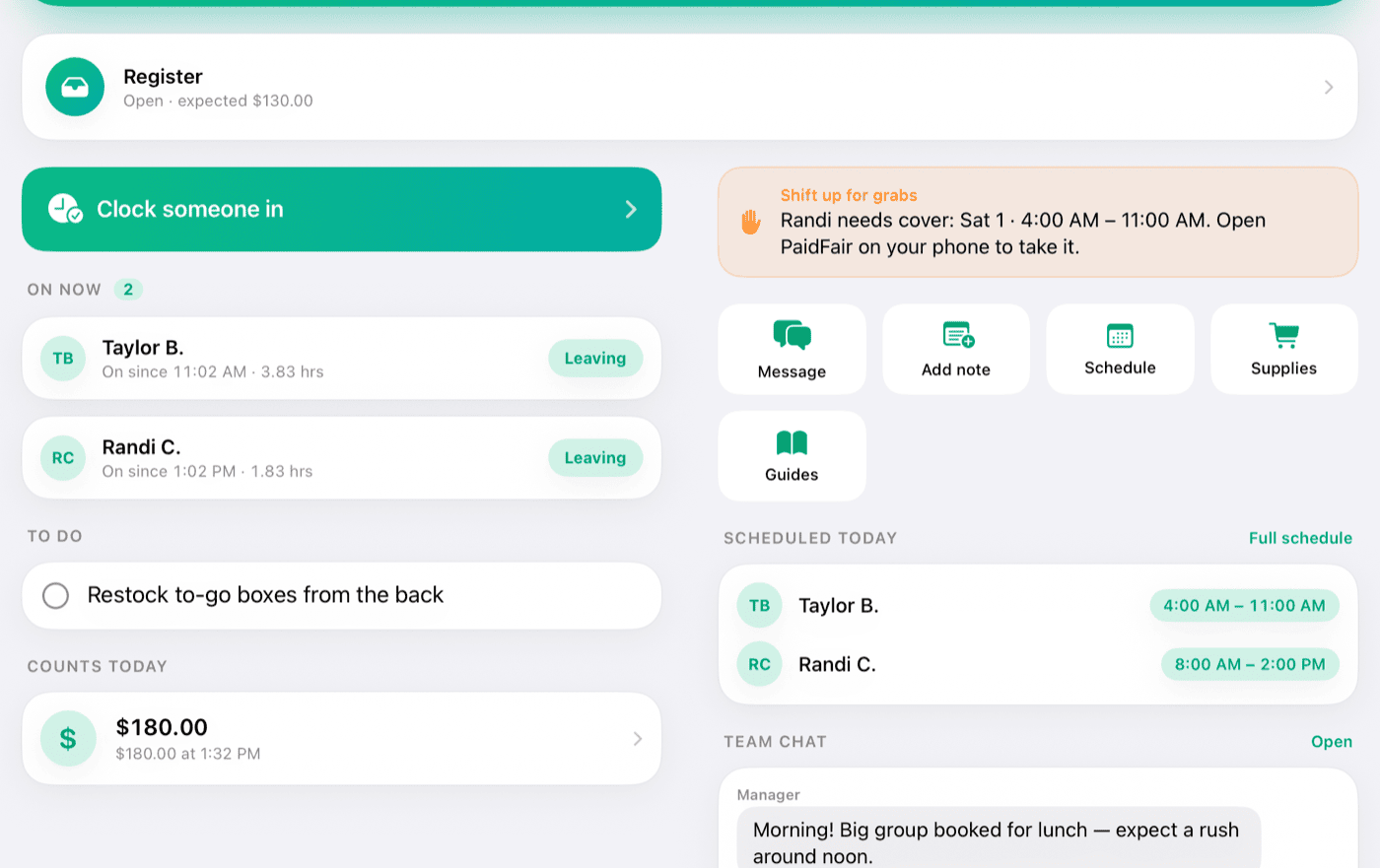
Great on a shared iPad.
Leave PaidFair open at the counter as the team's home base — clock in and out, count the jar, ring sales, and message the crew. Managers unlock the full picture with a passcode; everyone else just taps their name.
Your team clocks in with a QR code — no app to install
Print one poster for the counter. Anyone on the team scans it with their phone camera — Android or iPhone, any phone — taps their name, and they're on the clock. No download, no account, no shared password. They watch their own hours and tips climb live, and check their cut anytime by scanning again.
- 1Scan the poster with any phone's camera.
- 2Tap your name — that's the whole sign-in.
- 3You're on the clock — hours and tips update live, private to you.
Chores, but make it a competition.
Put up a weekly prize — first pick of shifts, a free drink, $20 — then just check a task off and tap who did it. The board climbs, confetti flies, and the closing checklist actually gets done.
And it stays fair: rank by most done, or by most per hour on the clock — so someone who packs a lot into a short shift can still win, exactly like the tips. Optional, like everything else.
Three taps from jar to fair.
Clock in your team
Tap a name when someone starts and when they leave. That's the only input PaidFair needs.
Count the jar
Enter the cash (and card tips, if you track them) whenever someone cashes out or the day ends.
Everyone gets their fair cut
PaidFair splits it by the minutes each person worked — and shows the math so nobody wonders.
Here's the actual math — remainder cents and all.
A real jar rarely divides evenly. PaidFair splits each count only across who was on the clock for it, assigns the leftover cents deterministically, and the parts always add back to exactly what you counted. Nothing rounded away, nothing invented.
Works with what you already run.
PaidFair doesn't rip out your POS, your payroll, or your bookkeeper — it fills the gap they leave (fair tips, the schedule, the hours) and hands them clean numbers. Close a pay period and export hours, wages, and tips — already broken out per person — straight into QuickBooks, Gusto, or ADP. You keep the record of truth; they cut the checks. Those per-person tip records are also exactly what the new “No Tax on Tips” deduction and 2026 W-2 reporting need.
PaidFair never rings a card or holds a dollar — on purpose. Keep processing on Square, Toast, Clover, Stripe, PayPal — or any terminal you already trust; PaidFair sits right alongside it for the tips, schedule, and hours it doesn't handle. Nothing to switch, nothing to conflict, and no new fee on your sales. Integrations coming so your card sales and tips flow in on their own — until then, drop the day's totals in with a tap.
See exactly what you'd hand your payroll — download a real sample export:
Free register. Fair price for the rest.
No per-employee fees, no contracts, no credit card to start. Just $29/month per location — or $249/year. Running several shops? Each is $29 (so 3 locations = $87/mo), and switching between them is built in.
- The full cash register
- Drawer tracking & over/short close
- No credit card — start in your browser
- Everything in Starter, plus…
- Fair tip splitting with tip-outs & trainee rates
- Scheduling, time-off, swaps & breaks
- Insights, guides, supplies & team messaging
- iPhone, Android & the web console — synced in the cloud
- Unlimited team, multi-location & payroll exports
- No credit card to start — cancel anytime
The whole shift, one flat price.
Most tools charge per employee, lock you into their hardware, or make fair tip splitting an add-on. PaidFair is $29/month per location — your entire team, no per-employee fees, no contracts.
| PaidFair | Per-employee scheduling apps | POS + payroll suites | |
|---|---|---|---|
| What you pay | $29/mo flatper location · whole team | Per employeeclimbs every time you hire | $$$ + hardwarecontracts & setup fees |
| Fair tip splitting, by the minute | ✓to the penny, math shown | Add-on or none | Rarely |
| Scheduling & time clock | ✓ | ✓ | Some |
| Free cash register | ✓free forever | ✗ | It is the register— and the lock-in |
| Hands your payroll clean tips & hours | ✓QuickBooks, Gusto, ADP | Some | Locks you in |
| No hardware — any browser or phone | ✓ | Usually | ✗ |
| Never touches cards or your money | ✓sits safely alongside your POS | — | Holds your funds |
General comparison to the usual alternatives — features and pricing vary by provider.
Your shop's data — locked down, never sold.
PaidFair is your honest record of tips and hours — it never moves money or touches a card. Your data is yours: encrypted, isolated to your shop, backed up automatically, never sold, and never used to train anything.
Encrypted in transit & at rest
Every connection is HTTPS/TLS, and your data is encrypted on the servers too — not just on the wire.
Isolated to your shop
Database-level access rules enforce it on every request — one shop can never read another's data.
Backed up automatically
Continuous cloud backups with point-in-time recovery — a lost or dead phone is never lost data.
Built on trusted infrastructure
Runs on SOC 2-compliant cloud platforms — the same infrastructure serious business apps rely on.
We never touch your money
No cards, no payouts, no wallet. Billing is handled by Apple and Stripe — card details never reach us.
Never sold, never trained on
Your tips and team data are never sold, shared for ads, or used to train AI. Ever.
Questions or trouble? A real person answers — email us and we reply within one business day.
Check our math before you trust it.
Two free calculators, no account needed — the same arithmetic the app runs every night. Put a real shift through one and see for yourself.
Tip pool calculator
Who worked which hours, what the jar counted — each person's exact share, to the penny.
Tip-out calculator
What you owe the bar, bussers and runners — and exactly what you keep.
Tip laws by state
Which states ban the tip credit, who can be in the pool, sourced to each labor agency.
Tip policy template
A written tip policy you can print, post and hand to new hires — generated in a minute.
Tipping guides
Pooling rules, tip-outs, and the tip deduction — plain English, every claim sourced.
Running a bar, café, food truck, taproom, restaurant or salon? Each one splits tips a little differently — here's how yours works.
Good to know.
How are tips actually split?
By the minutes each person worked, segment by segment. Tips counted at 6pm are only shared among people on the clock during that window — someone who left at 2pm gets nothing from it. Every payout shows its own arithmetic, and the parts always add back to the counted total exactly.
Does PaidFair process cards or move money?
No. It never touches cards and moves no money. The register is a cash-drawer calculator, and settlements just record cash one person physically handed to another.
Do I ring credit cards on PaidFair? What about my card processor?
You don't — and you don't need to. Keep processing cards on whatever you already use: Square, Toast, Clover, Stripe, PayPal, or any terminal. PaidFair works right alongside it for the tips, schedule, and hours — it never touches cards or holds money, so there's nothing to switch and nothing to conflict. Today you drop your day's card and cash totals in with a tap for reporting; processor integrations that pull those totals in automatically are on the way.
Is this payroll or tax software?
No — it's your record of tips and hours. Export the data as CSV or PDF into whatever payroll or accounting system you already use.
Does PaidFair work with QuickBooks?
It works alongside it — PaidFair doesn't replace your payroll or bookkeeper. Close a pay period and export hours, wages, and tips as CSV or PDF, already broken out per person, to hand to QuickBooks, Gusto, ADP, or your accountant. PaidFair keeps the record of truth; your payroll tool cuts the checks.
What about “No Tax on Tips” — can PaidFair help?
PaidFair isn't tax software, but the new federal tip deduction runs on good records — and from 2026, tips must be reported separately on the W-2. PaidFair keeps clean, per-person cash and card tip totals all year and exports them for your payroll or bookkeeper. See our plain-English No Tax on Tips guide. (Not tax advice.)
What kinds of businesses is it for?
Any small business where a team shares tips: cafés, restaurants, bars, food trucks, salons, and more. If you split a jar, PaidFair fits.
Can my staff see each other's pay?
No. Each teammate's view shows only their own hours and tips, behind an optional personal passcode. Managers see the full picture; nobody else does.
Can I run it from a computer? What about Android?
Yes to both. PaidFair runs on iPhone and Android, and a full manager console runs in any web browser — the live day, schedule, accounting, analytics, and multiple locations. Staff can even clock in and check their tips from a browser, so a shop with no unified device works fine. Everything syncs in the cloud.
Where is my data stored?
In your own secure account in the cloud, isolated to your shop and encrypted in transit — synced across your devices and backed up automatically, so a lost or dead phone is never lost data. It's never sold and never used for ads. PaidFair still moves no money and never touches cards.
How much does it cost?
The cash register is free forever. Everything else is $29/month per location (or $249/year) with a 14-day free trial. Running several spots? Each location is $29/month — multi-location roll-up and one-tap shop switching are included, so you only pay for the shops you actually run. No per-employee fees, cancel anytime.
Try everything free for 14 days.
Scheduling, time tracking, fair tip splitting, insights, and payroll-ready exports — all of it, free for two weeks. The cash register stays free forever. No per-employee fees, cancel anytime.
No credit card to start · works in any browser today · then $29/month per location · free register forever